On the documentation tool palette, copy and paste an existing tag tool. It does not matter which one-- I used the door tag tool. Rename your copied tag tool "Property Sets." Right click and go into the properties. Inside properties, change the type to "Property Set Data".
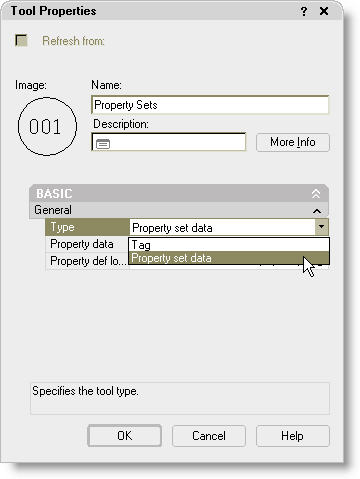 Then click on the icon in the property data box to open up the Add Property Sets dialog box. Select all and pick OK.
 When this tool is used in your drawing, it will load all the available property sets. This is a great tip for CADD Managers who are trying to set up their templates. You can load all the property sets, customize them to meet your company needs, and save it as your template. When users insert schedules and/or tags, the property sets that work with that schedule and/or tag will already be loaded into their drawing. If the property set already exists in the drawing, this ensures they are using the company standard property set.


1 comment:
Great Tip!
Thanks
Post a Comment